JeepParts
My Garage
My Account
Cart
OEM 2008 Dodge Viper Rack And Pinion
Steering Rack And Pinion- Select Vehicle by Model
- Select Vehicle by VIN
Select Vehicle by Model
orMake
Model
Year
Select Vehicle by VIN
For the most accurate results, select vehicle by your VIN (Vehicle Identification Number).
1 Rack And Pinion found
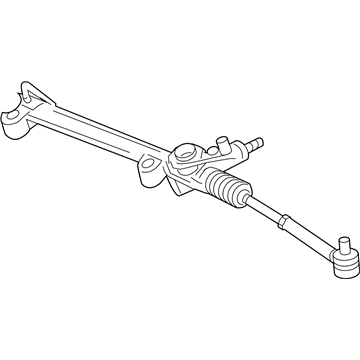
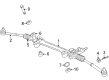
2008 Dodge Viper Steering Gear Part Number: 4865678AH
Product Specifications- Other Name: Gear - Rack And Pinion; Rack and Pinion Assembly; Steering Gearbox; Gear Assembly; Gear Rack And Pinion
- Replaces: 4865678AE, 4865678AD, 4865678AB, 4865678AC
- Item Weight: 24.80 Pounds
- Item Dimensions: 60.9 x 10.1 x 6.7 inches
- Condition: New
- Fitment Type: Direct Replacement
- SKU: 4865678AH
- Warranty: This genuine part is guaranteed by Mopar's factory warranty.
2008 Dodge Viper Rack And Pinion Parts and Q&A
- Q: How to Remove a Rack and Pinion Steering Gear on 2008 Dodge Viper?A: First, unhook the negative cable from the battery and secure it so the battery is unused. Hold the steering wheel straight while parked using a steering wheel lock. After that, take off the air cleaner housing and empty the power steering fluid from the reservoir. First, remove the power steering pressure hose and return hose connected to the rack and pinion. Unbolt the intermediate shaft (2) from the rack and pinion shaft (3) by removing the coupling pinch bolt and if it doesn't move easily, slide it off using a brass drift and hammer. Be sure to keep the toe pattern shims when taking off the rack and pinion; remember the number of these shims between the gear and each mount, as the same amount should be returned when installing. Take out the bolts (1) that help keep the rack and pinion (4) properly rigged, making sure you don't forget to collect the shims. Lift and hold up the car and then remove the front tire and wheel group. To your right, unfasten the nut from the outer tie rod (3) and use Puller Special Tool C-4150A (below the vehicle) to free the outer tie rod end from the knuckle. Pull the rack and pinion out of the car through the space next to the left front wheel, ahead of the steering knuckle.
Related 2008 Dodge Viper Parts
 2008 Dodge Viper Steering Wheel
 2008 Dodge Viper Power Steering Pump
 2008 Dodge Viper Power Steering Cooler
 2008 Dodge Viper Power Steering Hose
 2008 Dodge Viper Power Steering Reservoir
 2008 Dodge Viper Rack & Pinion Bushing
 2008 Dodge Viper Steering Column
 2008 Dodge Viper Steering Column Cover
 2008 Dodge Viper Steering Gear Box
 2008 Dodge Viper Steering Shaft
 2008 Dodge Viper Tie Rod Bushing
 2008 Dodge Viper Tie Rod End